
Short summary: Mac OS X’s default power management settings might wear your hard drive down unnecessarily. This post provides a lot of background information and how to change these settings.
I recently got a new MacBook Pro and one interesting thing i noticed was light “click” (a clicking noise) from it whenever it was idle for a few seconds. I pay attention to such things since I heard about problems with power management settings under Ubuntu, which could quickly wear down a hard drive. I experienced this myself, where one of my old hard drives started to sound like a frog :-/. So I installed smartmontools (either use MacPorts, fink or Homebrew) and checked:
smartctl -a /dev/disk0
smartctl 5.40 2010-10-16 r3189 [x86_64-apple-darwin10.7.3] (local build)
...
=== START OF INFORMATION SECTION ===
Device Model:     Hitachi HTS725050A9A362
...
User Capacity:    500,107,862,016 bytes
...
ID# ATTRIBUTE_NAME          FLAG     VALUE WORST THRESH TYPE      UPDATED  WHEN_FAILED RAW_VALUE
1 Raw_Read_Error_Rate     0x000b   100   100   062    Pre-fail  Always       -       0
2 Throughput_Performance  0x0005   100   100   040    Pre-fail  Offline      -       0
3 Spin_Up_Time            0x0007   164   164   033    Pre-fail  Always       -       2
4 Start_Stop_Count        0x0012   100   100   000    Old_age   Always       -       421
5 Reallocated_Sector_Ct   0x0033   100   100   005    Pre-fail  Always       -       0
7 Seek_Error_Rate         0x000b   100   100   067    Pre-fail  Always       -       0
8 Seek_Time_Performance   0x0005   100   100   040    Pre-fail  Offline      -       0
9 Power_On_Hours          0x0012   100   100   000    Old_age   Always       -       351
10 Spin_Retry_Count        0x0013   100   100   060    Pre-fail  Always       -       0
12 Power_Cycle_Count       0x0032   100   100   000    Old_age   Always       -       220
160 Unknown_Attribute       0x0032   100   100   000    Old_age   Always       -       0
191 G-Sense_Error_Rate      0x000a   100   100   000    Old_age   Always       -       21474836480
192 Power-Off_Retract_Count 0x0032   100   100   000    Old_age   Always       -       30064771073
193 Load_Cycle_Count        0x0012   097   097   000    Old_age   Always       -       36492
194 Temperature_Celsius     0x0002   148   148   000    Old_age   Always       -       37 (Min/Max 18/42)
195 Hardware_ECC_Recovered  0x000a   100   100   000    Old_age   Always       -       0
196 Reallocated_Event_Count 0x0032   100   100   000    Old_age   Always       -       0
197 Current_Pending_Sector  0x0022   100   100   000    Old_age   Always       -       0
198 Offline_Uncorrectable   0x0008   100   100   000    Old_age   Offline      -       0
199 UDMA_CRC_Error_Count    0x000a   200   200   000    Old_age   Always       -       0
223 Load_Retry_Count        0x000a   100   100   000    Old_age   Always       -       0
254 Free_Fall_Sensor        0x0032   100   100   000    Old_age   Always       -       66
...
As you can see I have a Hitachi 500GB 7200rpm drive. The puzzling fact here is the Load_Cycle_Count. You can see a value of 36,492 load cycle counts in 351 hours the HD was powered on, so approx. 100 per hour.
Put easily the load cycle count is how often your HD decided to park its heads. Depending on the manufacturer and HD model this can mean several things. In my case it means the number of times the HD’s heads are moved to a ramp next to the platters. The advantage of this is that being in this “parked” position the drive can shut down some energy consuming parts and it is much harder to damage the drive when the heads are parked (nothing there for a Head crash).
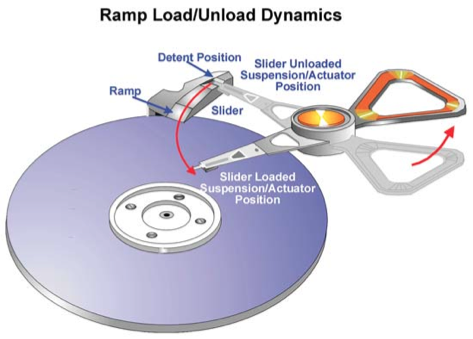
Ramp Load/Unload Dynamics (c) Hitachi
The downside of parking the heads is that HDs are usually not designed to do this every few seconds. Typical limits range from 300,000 to 600,000 (link) load cycle counts. (This doesn’t mean your HD will break if it does it more often, just that it’s more likely to fail if worn down like that.)
To observe the development of your Load_Cycle_Count you can use the terminal with this small one-liner:
while True ; do s="$(date) $(smartctl -a /dev/disk0 | grep 'Load_Cycle_Count')" ; echo $s | tee -a hddLoadCounts.log ; sleep 60 ; done
Di 17 Mai 2011 14:43:20 CEST 193 Load_Cycle_Count 0x0012 097 097 000 Old_age Always - 36492
...
The script will log the load cycle count to your terminal and a file called hddLoadCounts.log in the current directory every minute.
You might notice that when doing nothing but browsing this count increases by 2-8 every minute. Playing music with iTunes seems to stop this, as the HD keeps busy reading your music. Doing the maths you’ll find that it’s not unlikely that your drive will have over 300,000 load cycle counts withing the first half year (lucky music listeners, yours will last much longer 🙂 ).
As I had a bad feeling about this, i went on to have a look into Hitachi’s technical specs for my HD. Here you can find that my HD is designed for up to 600,000 load cycles (page 2), meaning approx. 6000 hours at the 100 cycles per hour rate. In the specs on page 135 you can find that if Advanced Power Management is enabled, the deepest reachable power saving is depending on the Power Management level. In general the Advanced Power Management Level is between 1 (power saving) and 254 (performance). If the Level is 0 or 255 no power saving is done, if the level is 1-127 it’s “Standby”, if the level is 128-191 it’s “Low Power Idle” and if it’s 192-254 it’s “Active Idle”.
As we’ll find out in a second, the default value (which Mac OS X sometimes seems to reset) seems to be 128, so “Low Power Idle” mode. The three power saving levels are explained in Section 12.6 “Advanced Power Management (Adaptive Battery Life Extender 3) Feature” of the specs. In short: “Active Idle” mode cuts down power consumption by 45-55%, the heads are parked near the mid-diameter of the disk, recovering takes about 20ms. In “Low Power Idle” mode power is cut down by 60-65%, the heads are unloaded to the ramp (this is the “parked” counted by Load_Cycle_Count), recovering takes 300ms. Transition into these modes is magically done internally by the HD (it observes what’s going on and decides what to do next), taking into account the Advanced Power Management Level. (“Standby” mode isn’t mentioned here, but it sure unloads the heads to the ramp, as it spins down the HD… recovery will take long, but unimportant, as we’re having a problem with “Low Power Idle” mode.)
So how do we find out which Advanced Power Management (APM) Level our HDD uses?
This doesn’t seem to be very easy in Mac OS X as there’s nothing like the hdparm on Linux.
There is the hdapm tool, but it can’t read the value, you can just set it. We’ll learn why this tool is necessary in a moment, but first let’s find out what the current value is.
The easiest way to accomplish this was to throw in a Linux Boot CD (Knoppix, Ubuntu, whatever you like), reboot, boot from CD (hold down the “c”-key), then fire up some terminal, become root (sudo -i and check the current APM value:
hdparm -B /dev/sda
For me it was 128.
You can check the immediate effect from within the Live CD: you can use smartctl -a /dev/sda. As before this kept increasing.
As I always handle my laptop with care and can live with 10 % more power consumption of my HD, I decided to change the default. WARNING: This might not be suitable for you, it’s your decision.
To stop this rapid growth of the load cycles, I first tried to set the value to 191, but i could still observe a rapid increase.
After setting the value to 192, it immediately stopped:
hdparm -B192 /dev/sda
Afterwards i rebooted, the Load_Cycle_Count increased by 1 over the reboot and no more after a couple of hours runtime (without iTunes keeping my HD busy, draining my battery). To my surprise the next day my logs showed that the load cycle count was increasing rapidly again, i rebooted back into linux and found the value was reset to 128. Weird. I reset it, rebooted, the count didn’t increase anymore, but at some point i again found it increasing rapidly. Based on this I assume Mac OS X or something else (like Windows run via bootcamp) sometimes resets that value to 128. My first guess was that maybe it is reset after resuming from sleep, but I couldn’t reproduce it by this. If someone finds out let us know in the comments.
To overcome this problem it seems sufficient to have a tool which explicitly resets the APM level once during system startup to something meaningful. That’s where we remember the hdapm tool: You can download it from the given page and install it as described in the user guide.
Afterwards edit /Library/LaunchDaemons/hdapm.plist to set the correct APM value. As a reference my file looks like this:
<?xml version="1.0" encoding="UTF-8"?>
<!DOCTYPE plist PUBLIC "-//Apple//DTD PLIST 1.0//EN" "http://www.apple.com/DTDs/PropertyList-1.0.dtd">
<plist version="1.0">
<dict>
        <key>Label</key>
        <string>hdapm</string>
        <key>Disabled</key>
        <false/>
        <key>ProgramArguments</key>
        <array>
                <string>/usr/local/bin/hdapm</string>
                <string>disk0</string>
                <string>192</string>
        </array>
        <key>ServiceDescription</key>
        <string>Set ATA Advanced Power Management level</string>
        <key>RunAtLoad</key>
        <true/>
        <key>LaunchOnlyOnce</key>
        <true/>
</dict>
</plist>
Notice that for other drives, especially other manufacturers the 192 might not be the right value. If you found the correct values for other drives, be welcome to share them (preferably with links to tech specs) in the comments.
Now, after four months since discovering the problem went by, my load cycle count only increased by about 500 (which is about the number of times i sent the mac to standby). Isn’t that a figure compared to the 36500 within the first month? 🙂
Edit (Sep. 22, 2011): Revised my guess about sleep causing the reset. Thx to Sam.
“To overcome this problem one needs a tool which regularly resets the APM level to something more meaningful”
Does you /Library/LaunchDaemons/hdapm.plist file have the hdapm tool run at regular interval? It seems it only have it run at startup. How to you make sure it’s being regularly set (i.e every few minutes or so, or everytime the macbook wakes up from sleep)?
Actually you’re right, my hdapm.plist only runs hdapm once when the system boots. Still my monitoring shows that even after sleeping the load cycle count doesn’t grow, so i’d say it’s enough to run it once at system startup.
Should you find out what causes the resetting of the apm value (maybe it’s complete shutdown or a restart from Windows (bootcamp) to Mac OS X again?) let us know. For now I’ll throw out my guess about the sleep & wake being the cause, as that clearly is not the case.
Thanks, Jörn
Thanks for the reply, and great post by the way!
Thank you so much for this post. It’s was in many ways a life saver.
I do think my hard disk have some problem… I have a mid 2011 Mac mini it does the clunk sound. It’s annoying as hell. Besides that I love it. I have a Hitachi 5400 rpm.
Device Model: Hitachi HTS545050B9A302
9 Power_On_Hours 0x0012 094 094 000 Old_age Always – 2650
12 Power_Cycle_Count 0x0032 100 100 000 Old_age Always – 234
191 G-Sense_Error_Rate 0x000a 100 100 000 Old_age Always – 4294967296
193 Load_Cycle_Count 0x0012 098 098 000 Old_age Always – 26417
254 Free_Fall_Sensor 0x0032 088 088 000 Old_age Always – 3259
I thought the G-Sense of the disk is malfunctioning. Mac mini is standing still on top of desk.
Store said this is normal behavior but other Mac mini (also mid 2011 and same Hitachi disk) don’t make sound 🙁
The “G-Sense Error Rate” seems to be “nonsense” on my system as well, but if that thing is just standing still on a desk the high number of “Free Fall Sensor” would make me feel uncomfortable.
Usually that only happens when the HD sensor notices that the acceleration weird and decides to prepare the disk for impact. Mine is 161 in a Mac Book Pro, so should get a lot more movement…
Sorry for the question, but: do you sometimes hit the table or does it get a lot of “strong vibrations”?
i have 2 mac minis.
the newer 2010 mac mini hard drive just started clicking and it failed. it ran for 1 year and 1 day. luckily i had applecare and a good time machine
my other mac mini is a 2006 intel with a 7200 rpm western digital scorpio black
that drive seems totally fine.
my power on hours on that drive is 23,721
load cycle count is 2,310,892
Well as i said: this depends on the decisions the hard drive manufacturer took for that model and the power management settings. Could well be that the WD scorpio black understands the load cycle count to be something completely different or that they are designed for more load cycles or that you’re just having luck. To find out what it is you’d need to have a good look into their technical specs.
My general rule of thumb is: when your pc is idle (i really mean idle, so not doing any background indexing or stuff) and you still hear noise from the hard drive on a regular basis then something is set to wear down the mechanics (as that is what you hear).
Sure you can say: “but mine still works”, but why setting it to such defaults in the first place? Especially for a mac mini which is not carried around at all!?!
I’ve just got my first Mac (Mac Mini Late 2012), but I’m a master Windows power user and technician, and so naturally one of the first things I did with this new machine was investigate all the hardware in depth, and I noticed my HD SMART Load Count Cycles rapidly increasing. With a 2 week old Mac Mini, it’s already at 8800 Cycles on my factory Hitachi 500GB 5400RPM internal drive.
In Windows I deal with this via HDSentinel which has AAM/APM setting adjustment that you can mark to readjust on login.
This webpage turned up as one of the first Google results for “how to disable power management mac mini hard drive”.
Excellent article! I’ve got hdapm installed and by default it seems to set the hdapm.plist to “max” which evidently covers all drives. I’ll be watching my Load Count Cycles to see what happens.
Thanks for sharing this!
you’re welcome… sorry for the issue with the comment, seems it was silently classified as spam ?!?
Thank you for writing this article and for keeping it on line. I found it very useful even after more than three and a half years. It’s an issue that Apple has never addressed and as Apple doesn’t seem to use mechanical hard disks any more it is now not likely ever to be addressed. All modern hard disks now use the ramp loading method and that, in itself, is not a bad thing. However, there is great pressure for the manufacturers to show their green credentials and power saving is high on their list of desirable features. Hitachi (HGST, now part of the Western Digital family) drives still behave as you describe, the 18-month old one in my MacBook Pro having accumulated over 2.4 million head load cycles at the rate of about four a minute until I stopped it with this fix. As further evidence that it’s an incompatibility with Mac OS X, the hard disk in my old Windows Vista laptop (actually, the same model as yours) had accumulated only 245 head load cycles in about twice the number of power on hours.
Other makes of hard disk are also affected. I know of another MacBook Pro with one of the Toshiba hybrid SSHDs that was also accumulating head load cycles at a worrying rate. In this case setting a value of 192 didn’t seem to make much difference, while at value of 254 did the trick. I haven’t been able to get such a detailed data sheet from Toshiba – the ones from Hitachi are excellent.
I also know of a Mac mini that was fitted with a Western Digital Blue drive that was also accumulating head load cycles at an uncomfortably fast rate. This seemed to be caused by a different but related problem that was fixed without having to apply the hdapm fix. There is a range of Western Digital drives that are specially optimised for power saving. WD calls them the Green series and markets them specifically as secondary storage devices, pointing out that they are not meant for use as system drives because they unload their heads after as little as eight seconds of idleness. WD makes a whole variety of products that are optimised for different purposes – the Red range for NAS use, the Black range for performance, the Blue range for everyday value. It seems that while the Green drives unload their heads after eight seconds, the Reds and Blues have a longer idle timeout of five minutes, while the Black ones never unload the heads simply to save power. WD gives this timer a name, Idle3, and it seems that there are batches of Red and Blue drives out there that have the Idle3 timer incorrectly set to eight seconds in the factory. I don’t know whether WD has actually admitted to this error but it did release a DOS utility called WDIDLE3.EXE for power users to adjust this timer. I’ve used it myself to correctly set the Idle3 timer of two WD Scorpio Blue drives to five minutes – as new they were set to eight seconds.
To conclude, then, the head load cycle count is a problem, especially for Mac users who have mechanical hard disks. It’s been a problem for years and neither Apple nor the drive manufacturers have much inclination to address it. There’s the related but different WD issue, but at least there’s a tool to fix it. For other makes of drive the hdapm tool works well.
Jörn,
just a big thanks out to you for this elderly post. Saved us some bucks and hazzle, as we are running a bunch of mac pros and hackintoshs with complex raid arrays.
Best
Nickel
😉 you’re wrelcome
Thanks for all the good advice, the APM helped already.
Some other worrying thing with the FreeFall Sensor count .
I have a iMac from late 2012 with 8014 hours run time. Fully updated.
HDD is a APPLE ST1000LM024 (Seagate make I guess)
Load Cycle Count Raw Value: 942723 (is abt 117 per running hour, so little high)
But the Free Fall Sensor Raw value : 1533303324672 …
The iMac is very slow. What is next to do?
hmm, if those values are accurate, you should really back up your data and replace the drive. looks like imminent drive failure to me.
@Leon: 1533303324672 == 0x16500000000
IOW, since all 8 nibbles (i.e., full 32bit) are zero, I’d think that one can safely assume that the counter part is zero (IOW, nothing occurred), and at most some “flag values” are set (but I’d be inclined to think that that is just improper evaluation of vendor-specific stuff).
ouh, nice catch
YES! Thank you so much for this easily accessible article.
I had to replace the HD (running next to a SSD) of my trusty 2011 MBP. It had accumulated almost a mio. load cycle counts (and had 8 reallocates). Got a Z7K500 and noticed the ridiculous growth of lccs. Using hdapm and your .plist solved it for me too. Thanks again! Alex
Thank you for the interesting contribution!
Just out of curiosity I downloaded the trial version of DriveDx and ran it on my 2007 MBP:
Power On : 20,181 hrs
Load Cycle Count: 2,091,437
So, about to pack in?
Finally, reached here. To save my little poor HDD from ticking sounds!
Thank you, Jörn.